
Your MCP server on AgentCore Runtime fails its health check at `/mcp/`. Here’s how to fix it.
We deployed the k9 MCP server to AWS Bedrock AgentCore Runtime. Tool calls worked for the first few minutes of every session, then started failing with MCP error -32010: Runtime health check failed or timed out. Local tests stayed green throughout.
The fix is one small middleware. Diagnosing it took a few hours because the AWS docs contradict themselves on an important detail. This post is the page we wish we had found.
What the failure looks like from the client
Run a sustained agent loop against your deployed runtime. After a few minutes the client surfaces:
MCP error -32010: Runtime health check failed or timed out. Please make sure
that health check is implemented according to the requirements here -
https://docs.aws.amazon.com/bedrock-agentcore/latest/devguide/runtime-service-contract.html
The error appears on valid, authenticated requests that succeeded a minute earlier. Following the linked docs page does not help. It points to the MCP protocol contract, which describes the endpoint as POST /mcp and never mentions a health-check protocol for MCP runtimes.
The error message does not appear in the container’s CloudWatch logs. AgentCore generated it without forwarding the request to your code.
What you’ll find in the logs
Add a request-log middleware that records method, path, status, and whether Authorization is present on every inbound request. Here’s the one we use:
import logging
import time

from starlette.middleware.base import BaseHTTPMiddleware

log = logging.getLogger(__name__)

async def request_log(request, call_next):
    t0 = time.monotonic()
    response = await call_next(request)
    dur_ms = int((time.monotonic() - t0) * 1000)
    log.info(
        "req method=%s path=%s status=%d dur_ms=%d auth=%s sid=%s ct=%r",
        request.method,
        request.url.path,
        response.status_code,
        dur_ms,
        "yes" if request.headers.get("authorization") else "no",
        request.headers.get("mcp-session-id") or "-",
        request.headers.get("content-type", ""),
    )
    return response


app.add_middleware(BaseHTTPMiddleware, dispatch=request_log)
Mount it outermost so it observes every request, including the ones your auth middleware rejects. In Starlette, the last middleware added is the outermost wrapper.
Watch CloudWatch under /aws/bedrock-agentcore/runtimes/<runtime-id>-DEFAULT. You’ll see this pattern, every two seconds, throughout the microVM’s lifetime:
req method=POST path=/mcp/ status=401 dur_ms=0 auth=no sid=- ct='application/json'
req method=POST path=/mcp/ status=401 dur_ms=0 auth=no sid=- ct='application/json'
req method=POST path=/mcp/ status=401 dur_ms=0 auth=no sid=- ct='application/json'
Each request comes from 127.0.0.1 (the AgentCore sidecar inside the microVM), uses rotating source ports, carries an empty User-Agent, has no Authorization header, and posts to /mcp/ with the trailing slash. None of it reaches your tool code. None of it carries a session id.
This is AgentCore’s internal liveness probe. If your auth middleware rejects unauthenticated requests with 401 (which the protocol contract page says you should), the probe accumulates failures until AgentCore decides the runtime is unhealthy and stops forwarding user traffic.
Why the docs make this hard to find
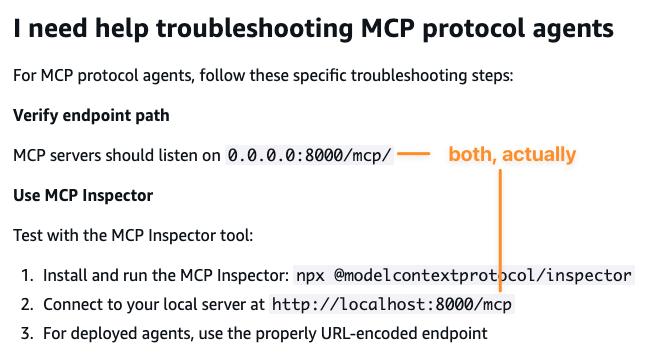
Two AWS doc pages disagree about a critical fact: where the MCP server’s HTTP path lives.
The MCP protocol contract page documents the path as /mcp, no trailing slash:
/mcp - POST… Receives MCP RPC messages and processes them through your agent’s tool capabilities
The Troubleshoot AgentCore Runtime page documents the path as /mcp/, with trailing slash, in a single offhand bullet:
Verify endpoint path: MCP servers should listen on
0.0.0.0:8000/mcp/
In practice, the platform uses both. User invocations go to /mcp. The liveness probe goes to /mcp/. Most MCP SDKs (including the Python SDK’s FastMCP, which the official AgentCore tutorial uses) register the endpoint at /mcp by default with exact path matching. A request to /mcp/ does not reach the tool handler. It hits your auth middleware first and gets rejected.
We provided feedback on the docs and shared in the AWS Community Builder Slack. Until the AgentCore team reconciles the docs and clarifies probe behavior, you have to handle both paths yourself.
The fix
Add a Starlette middleware (or your framework’s equivalent) that short-circuits the AgentCore probe with a 200 OK before your auth middleware runs. Match only the exact probe fingerprint so a real authenticated request to /mcp/ would still fall through to your auth code:
from starlette.middleware.base import BaseHTTPMiddleware
from starlette.responses import JSONResponse


async def agentcore_probe_short_circuit(request, call_next):
    client_host = request.client.host if request.client else None
    if (
        request.method == "POST"
        and request.url.path == "/mcp/"
        and client_host == "127.0.0.1"
        and not request.headers.get("authorization")
    ):
        return JSONResponse({}, status_code=200)
    return await call_next(request)


app.add_middleware(BaseHTTPMiddleware, dispatch=agentcore_probe_short_circuit)
Mount this after your auth middleware in code so it ends up outer on the request path. The probe never reaches auth. Everything else falls through to auth as before.
The four guards (POST, /mcp/, source 127.0.0.1, no Authorization) are deliberate. They match the exact fingerprint of AgentCore’s probe and nothing else. An external attacker cannot bypass auth through this path because they will not be on 127.0.0.1.
After deploying the fix, the same log line shows status=200 instead of status=401 for the probe, and -32010 "Runtime health check failed or timed out" stops appearing on the client. The first deploy we did with this change ran a multi-hour sustained agent workload end to end clean, where the previous run had failed at the four-minute mark.
What I’d do differently
We spent a few hours identifying and eliminating potential issues such as DNS rebinding protection, MCP SDK regressions, and OpenAI-connector-style DELETE cascades. Each hypothesis was plausible against the GitHub issues we found. None of them were the bug. The evidence was one middleware away from CloudWatch the entire time.
When a deployed system fails and your local environment passes the same tests, stop reading and start instrumenting. Ten lines of structured logging on every inbound request would have surfaced the /mcp/ storm in one observation cycle. We left that middleware in place after the fix. The middleware costs nearly nothing and gives us a searchable log of every MCP request. That log is the first place we look when a session management, security, or performance question comes up.