
Export Findings from Security Hub in OCSF Format: A Complete Guide
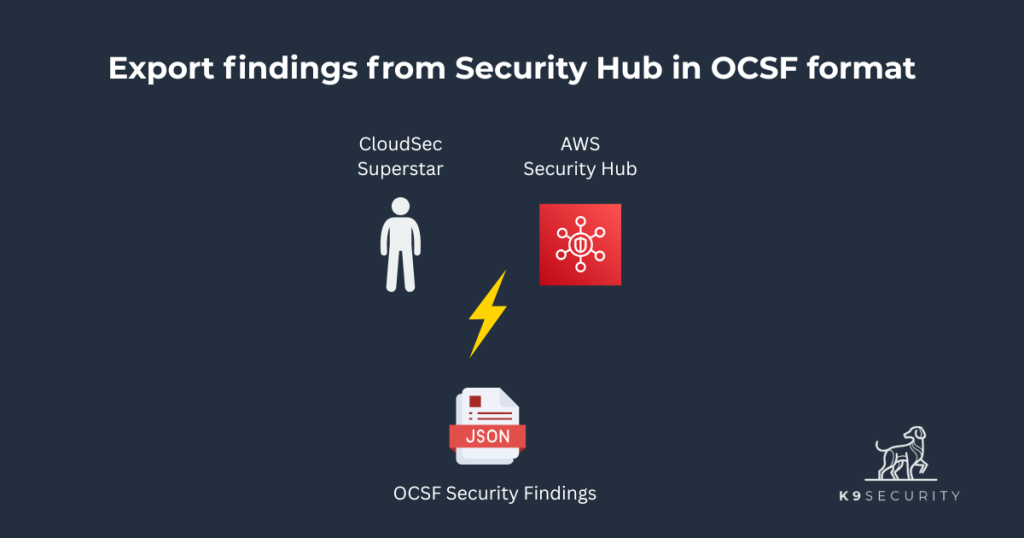
Security teams have long been challenged by security findings scattered across many tools in proprietary formats that don’t play well together. If you’re managing AWS Security Hub findings and need to analyze them alongside data from other security tools, you’ve likely hit this wall. The Open Cybersecurity Framework (OCSF) provides the solution – a standardized format that makes security data portable and analyzable across platforms. And Security Hub supports export of findings to OCSF format natively.
This guide shows you exactly how to export your Security Hub findings in OCSF format using two methods: the AWS CLI for quick exports and a Python script for more maintainable, programmatic access. You’ll walk away with working code examples and a clear understanding of when to use each approach.
Prerequisites
Before exporting findings, ensure your IAM principal has the securityhub:GetFindings permission. The SecurityAudit AWS managed policy includes this permission along with other read-only security permissions you might need.
You’ll also need the AWS CLI installed and configured with appropriate credentials for your AWS account. For the Python script method, you’ll need Python 3.10+.
Method 1: Export Security Hub Findings via AWS CLI
The AWS CLI provides the quickest way to export Security Hub findings in OCSF format. This method works well for modest on-demand exports and automation that needs simple filters.
Basic Export Command
The core command to export findings from Security Hub in OCSF format is:
aws securityhub get-findings-v2 --output=json | jq '.Findings' > ocsf-findings.jsonThis command retrieves findings and saves them directly in OCSF-compliant JSON format. Security Hub’s GetFindingsV2 API automatically returns findings in OCSF structure in the Findings element of the response, eliminating any need for format conversion. The command pipes the AWS CLI’s output through jq to extract the value of the Findings element and redirects that to the ocsf-findings.json file.
Export all findings for an Account
To export all findings for a specific AWS account, filter findings on the cloud.account.uid field:
aws securityhub get-findings-v2 --output=json \
  --filters '{
  "CompositeFilters": [
    {
      "StringFilters": [
        {
          "FieldName": "cloud.account.uid",
          "Filter": {
            "Value": "123456789012",
            "Comparison": "EQUALS"
          }
        }
      ]
    }
  ]
}' | jq '.Findings' > account-findings.json
Export findings from default view of Security Hub Posture Management
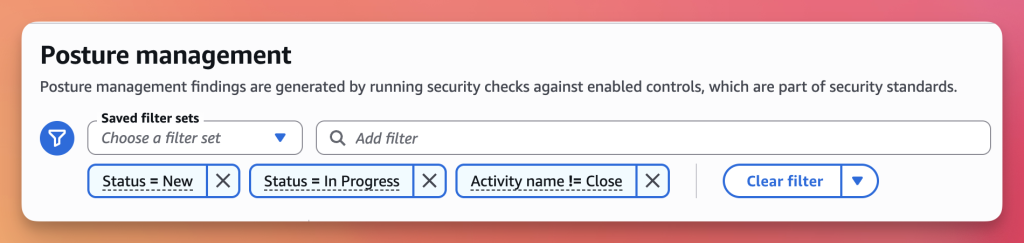
AWS Security Hub’s Posture Management view filters by the ‘active’ set of findings by default:
statusisNeworIn Progressactivity_nameis not equal toClose
You can export that same active set of findings with the following command:
aws securityhub get-findings-v2 --output=json \
  --filters '{
  "CompositeOperator": "AND",
  "CompositeFilters": [
    {
      "StringFilters": [
        {
          "FieldName": "activity_name",
          "Filter": {
            "Value": "Close",
            "Comparison": "NOT_EQUALS"
          }
        }
      ]
    },
    {
      "Operator": "OR",
      "StringFilters": [
        {
          "FieldName": "status",
          "Filter": {
            "Value": "New",
            "Comparison": "EQUALS"
          }
        },
        {
          "FieldName": "status",
          "Filter": {
            "Value": "In Progress",
            "Comparison": "EQUALS"
          }
        }
      ]
    }
  ]
}' | jq '.Findings' > active-findings.json
This query composes filters against the status and activity_name fields with an AND operator.
Filter by Severity
You can export only the ‘high’ severity issues by filtering for Fatal, Critical, and High severity findings:
aws securityhub get-findings-v2 --output=json \
  --filters '{
  "CompositeFilters": [
    {
      "Operator": "OR",
      "StringFilters": [
        {
          "FieldName": "severity",
          "Filter": {
            "Value": "Fatal",
            "Comparison": "EQUALS"
          }
        },
        {
          "FieldName": "severity",
          "Filter": {
            "Value": "Critical",
            "Comparison": "EQUALS"
          }
        },
        {
          "FieldName": "severity",
          "Filter": {
            "Value": "High",
            "Comparison": "EQUALS"
          }
        }
      ]
    }
  ]
}' | jq '.Findings' > high-severity-findings.json
Note: The CompositeFilter object filtering on severity uses an Operator key with a value of OR, so that Security Hub filters for findings with any of the specified values. A CompositeFilter Operator defaults to AND, which makes no sense when used with single-valued fields like severity.
Filter by Severity and Date Range
Suppose you want to export ‘high’ severity findings created in the past 30 days. Combine filters on:
finding_info.created_time_dtis within the past 30 daysseverityis one ofFatal,Critical, orHigh
Use the following command and filters:
aws securityhub get-findings-v2 --output=json \
  --filters '{
  "CompositeOperator": "AND",
  "CompositeFilters": [
    {
      "DateFilters": [
        {
          "FieldName": "finding_info.created_time_dt",
          "Filter": {
            "DateRange": {
              "Unit": "DAYS",
              "Value": 30
            }
          }
        }
      ]
    },
    {
      "Operator": "OR",
      "StringFilters": [
        {
          "FieldName": "severity",
          "Filter": {
            "Value": "Fatal",
            "Comparison": "EQUALS"
          }
        },
        {
          "FieldName": "severity",
          "Filter": {
            "Value": "Critical",
            "Comparison": "EQUALS"
          }
        },
        {
          "FieldName": "severity",
          "Filter": {
            "Value": "High",
            "Comparison": "EQUALS"
          }
        }
      ]
    }
  ]
}' | jq '.Findings' > recent-high-severity-findings.json
There are two things to note about this command. First, the CompositeOperator key filter findings from the list of composite filters with the AND operator. This means the resulting findings will match both the severity and finding_info.created_time_dt filters. Second, the DateRange is specified as a positive number of 30 days. This positive number goes back in time from the time of the query. (I initially guessed incorrectly that the range would be specified as a negative number as docs are not clear on the allowed value)
Method 2: Export via Python Script
While the AWS CLI is powerful, constructing complex JSON filters on the command line can be unwieldy and difficult to understand over the long term. The nested JSON structures and exact spelling and casing of field values for status, severity, and activity_name may be hard to maintain in shell scripts. Handling pagination for large result sets is another challenge. A Python script with clear, named arguments is a natural next step for teams that need to export findings regularly or integrate exports into varied automation workflows.
Why Use a Python Script
The Python approach offers several advantages:
- Readable Arguments: Replace complex JSON with simple command-line flags like
--accountand--severity - Better Error Handling: Get clear error messages instead of cryptic JSON parsing errors
- Pagination Built-in: The script handles pagination automatically without complex
shell+jqlogic
We’ve shared an export_ocsf_findings_security_hub.py script to make exporting OCSF findings from Security Hub easier. This export tool is the first of a planned set of tools in our ocsf-findings-tools repository, so you can use it directly or as a starting point for your own tool.
Script Setup and Requirements
If you want to try the OCSF export tool yourself, you can set it up with:
git clone https://github.com/k9securityio/ocsf-findings-tools.git
cd ocsf-findings-tools
python3 -m venv .venv
source .venv/bin/activate
pip3 install -r requirements.txt
Once that completes, the following should show you usage instructions:
./export_ocsf_findings_security_hub.py --helpBasic Usage Examples
The Python script makes common export tasks much simpler. Here are the same exports we did with the AWS CLI, now with clearer syntax:
# Export all findings (no filters)
./export_ocsf_findings_security_hub.py > all-findings.json

# Export findings for a specific account
./export_ocsf_findings_security_hub.py --account 123456789012 > account-findings.json

# Export 'active' findings like the default Security Hub Posture Management filter
./export_ocsf_findings_security_hub.py \
  --status New \
  --status "In Progress" \
  --activity-name-not Close > active-findings.json

# Export high-severity findings
./export_ocsf_findings_security_hub.py \
  --severity Fatal \
  --severity Critical \
  --severity High > high-severity-findings.json

# Export recent high-severity findings
./export_ocsf_findings_security_hub.py \
  --created-days-ago 30 \
  --severity Fatal \
  --severity Critical \
  --severity High > recent-high-severity-findings.json
The commands are much cleaner without the JSON filter syntax cluttering the script or terminal. The script handles all the complexity of building the proper OCSF filter structure internally. It also validates the values provided to the status, severity, and activity name options so that you don’t accidentally filter everything or nothing with a typo.
Advanced Filtering Examples
The script really shines when combining multiple filters:
# Export critical findings from the last 30 days
./export_ocsf_findings_security_hub.py \
  --created-days-ago 30 \
  --severity Critical > recent-critical-findings.json

# Export new findings for a specific account from the last week
./export_ocsf_findings_security_hub.py \
  --account 123456789012 \
  --status New \
  --created-days-ago 7 > weekly-new-findings.json

# Export all high-severity findings from the last 90 days for an account
./export_ocsf_findings_security_hub.py \
  --account 123456789012 \
  --severity Fatal \
  --severity Critical \
  --severity High \
  --created-days-ago 90 > quarterly-high-severity.json
The script automatically handles:
- Building the correct
CompositeFiltersstructure - Managing pagination for large result sets
- Proper error handling for API failures
- Combining multiple filters with the correct AND/OR logic
Most of the script is pretty straightforward. The script parses arguments, builds the finding filters, gets the findings from Security Hub, then prints the results to stdout.
The most interesting method is build_filters:
def build_filters(args) -> dict:
    """Build the filters dict for the get_findings_v2 API based on command line arguments."""
    filters = {}
    composite_filters = []

    # Account filter
    if args.account:
        account_filters = [
            {
                "FieldName": "cloud.account.uid",
                "Filter": {
                    "Value": args.account,
                    "Comparison": "EQUALS"
                }
            }
        ]
        _append_string_filters(composite_filters, account_filters)

    # Status filter (multiple values with OR)
    if args.status:
        status_filters = [
            {
                "FieldName": "status",
                "Filter": {
                    "Value": status,
                    "Comparison": "EQUALS"
                }
            }
            for status in args.status
        ]
        _append_string_filters(composite_filters, status_filters, "OR")

    # Severity filter (multiple values with OR)
    if args.severity:
        severity_filters = [
            {
                "FieldName": "severity",
                "Filter": {
                    "Value": severity,
                    "Comparison": "EQUALS"
                }
            }
            for severity in args.severity
        ]
        _append_string_filters(composite_filters, severity_filters, "OR")

    # Activity name filter (multiple values with OR)
    if args.activity_name:
        activity_filters = [
            {
                "FieldName": "activity_name",
                "Filter": {
                    "Value": activity_name,
                    "Comparison": "EQUALS"
                }
            }
            for activity_name in args.activity_name
        ]
        _append_string_filters(composite_filters, activity_filters, "OR")

    # Activity name NOT filter (exclude certain activity names)
    if args.activity_name_not:
        activity_not_filters = [
            {
                "FieldName": "activity_name",
                "Filter": {
                    "Value": activity_name,
                    "Comparison": "NOT_EQUALS"
                }
            }
            for activity_name in args.activity_name_not
        ]
        # Multiple NOT_EQUALS need to be AND'ed together
        # (i.e., not Close AND not Archive)
        _append_string_filters(composite_filters, activity_not_filters, "AND")

    # Date filter (created days ago)
    if args.created_days_ago:
        composite_filters.append({
            "DateFilters": [
                {
                    "FieldName": "finding_info.created_time_dt",
                    "Filter": {
                        "DateRange": {
                            "Unit": "DAYS",
                            "Value": args.created_days_ago
                        }
                    }
                }
            ]
        })

    # Build final filters structure
    if composite_filters:
        if len(composite_filters) == 1:
            filters["CompositeFilters"] = composite_filters
        else:
            # Multiple filters need AND operator
            filters["CompositeOperator"] = "AND"
            filters["CompositeFilters"] = composite_filters

    return filters
The build_filters method handles each of the supported command-line filter options, constructs a list of StringFilter or DateFilter objects, then adds those data structures to the composite_filters. The _append_string_filters helper function constructs a StringFilters object with an appropriate Operator key then adds the filter object to the composite_filters.
It’s not exactly rocket science but it is interesting to see how simple query requirements can lead to a non-trivial filter-building code.
So what are finding exports good for?
Real-World Use Cases for OCSF Export
Multi-Tool Security Analysis
Security teams often need to correlate or integrate Security Hub findings with data from other security tools. By exporting to OCSF, you can combine AWS security findings with data from:
- Cloud security posture management (CSPM) tools
- Vulnerability scanners
- SIEM solutions
- 3rd-party OCSF findings analysis tools
- Custom tools
OCSF enables you to take your findings data and quickly merge it with findings from another source or analyze the findings in your tool of choice – which might be a custom tool!
Compliance Reporting
OCSF export streamlines compliance reporting by standardizing security data. You can:
- Generate consistent reports across multiple cloud providers
- Track security posture improvements over time
- Provide auditors with standardized security evidence
- Automate compliance metric calculations
And you can always keep a copy of findings in a given period, project, or client engagement in a simple file.
Security Data Warehousing
Finally, organizations building security data warehouses benefit from OCSF’s standardized schema. Export Security Hub findings and import to a data warehouse like Amazon Security Lake to:
- Use your preferred analytics tools
- Build historical trending analysis
- Train machine learning models on consistent data
- Create executive dashboards with unified metrics
Standardized security finding data provides a solid foundation for many security capabilities.
Conclusion and Next Steps
Exporting Security Hub findings in OCSF format opens new possibilities for security analysis and integration. Whether you choose the AWS CLI for quick one-off exports or the Python script for regular, maintainable exports, you now have the tools to standardize your security data.
Start with the AWS CLI method to test your export process and understand your data. As your export needs become more regular or complex, transition to a Python script for cleaner, more maintainable code.
Ready to analyze your exported OCSF findings? Try k9 Security’s Cloud Security Studio to assess your security posture quickly and prepare a stakeholder-ready assessment from your OCSF security findings in just a few minutes.